Word, PDF or Canva? Choosing the Right NDIS Template Format

Information current as at 25 August 2026
One worker completes a form in Word. Another prints an older PDF. A manager updates the Canva master—but nobody tells the rest of the team.
Before long, the same service has three versions of one document, inconsistent records and no certainty about which copy is current.
Templates can make NDIS documentation more manageable, but the file format matters. Word, PDF and Canva each suit different tasks. Choosing the right format—and controlling how it is customised, approved, stored and reviewed—can save time while supporting clearer and more consistent provider records.
NDIS Template Formats: The Quick Answer
Word is usually best for policies, procedures and documents requiring substantial editing.
PDF is useful when you need a consistent layout for viewing, printing, reference or controlled completion.
Canva works well for branded, visual and participant-facing resources.
A combination of formats is often the most practical approach.
The important point is that a professional-looking template is only a starting structure. It does not create compliance by itself.

What NDIS templates can—and cannot—do
A suitable template can help a provider:
avoid repeatedly starting from a blank page;
organise required information into clear sections;
create consistent prompts for workers;
maintain a recognisable structure across records;
support document control and review;
identify missing information more easily; and
prepare evidence for internal reviews or audits.
However, templates cannot confirm that a provider’s real-world practices are lawful, safe or compliant.
The NDIS Practice Standards specify the quality standards registered providers must meet. The applicable standards depend on the provider’s registration and the supports it delivers. Auditors use the related quality indicators when assessing how a provider demonstrates compliance.
The NDIS Code of Conduct has broader coverage. It applies to registered and unregistered NDIS providers, their key personnel and workers.
This means every template must be reviewed against:
the provider’s registration status and registration groups;
the services and supports actually delivered;
participant needs, rights and communication preferences;
worker roles and responsibilities;
current NDIS rules, standards and official guidance;
applicable Commonwealth, state and territory laws; and
the provider’s actual operating procedures.
Current NDIS update: Supported independent living providers must be registered from 1 July 2026 and the new Supported Independent Living Practice Standards now apply. Relevant SIL providers should review their agreements, governance records, safeguarding processes, staff instructions and evidence of participant involvement.

When Word templates work best
Microsoft Word is usually the most flexible option when a document contains substantial text or needs regular revision.
Word may be suitable for:
policies and procedures;
service agreement master documents;
support plans and risk plans;
intake and referral forms;
meeting minutes;
staff instructions;
internal review documents; and
longer operational manuals.
Its advantages include tracked changes, comments, headings, tables and relatively easy collaboration.
The main risk is uncontrolled duplication. Files named “final,” “final updated” and “final version two” can quickly become confusing.
To manage Word documents effectively:
keep one approved master copy;
give every document an owner;
include a version number and approval date;
restrict who can edit the master;
store superseded versions separately;
use consistent file names; and
export approved versions to PDF when appropriate.
When PDF templates work best
PDFs preserve layout more consistently across different devices and software. They are useful for documents that need to be viewed, printed or distributed without the formatting moving.
PDF may be suitable for:
approved policies provided for reference;
participant information sheets;
finalised agreements and completed records;
printable checklists;
fillable forms;
staff handouts; and
documents sent to external parties.
A PDF is not automatically read-only, accessible or secure. Some PDFs can be edited, and password protection alone should not be treated as a complete information-security system.
Before using a PDF, check that:
the font and contrast are readable;
headings follow a logical order;
fillable fields work correctly;
keyboard users can move through fields in the correct order;
instructions do not rely on colour alone; and
completed copies are stored in an approved recordkeeping system.
When Canva templates work best
Canva can be helpful for documents where visual presentation, branding and ease of layout are important.
Canva may work well for:
participant handbooks;
welcome packs;
visual checklists;
brochures and flyers;
training presentations;
posters;
social media resources; and
simplified participant information.
It allows providers to update branding, colours, images and layouts without advanced design skills. However, a visually attractive document can still be difficult to understand if it contains small text, low contrast, crowded pages or unclear instructions.
A simplified design should also not automatically be described as “Easy Read.” Easy Read resources require careful language, supporting images, accessible layout and, ideally, review by people from the intended audience.
Canva or another design platform can be used to customise a blank master. Before entering identifiable participant information into any online platform, the provider should assess its privacy, security, user access, data-storage location and retention arrangements.

A seven-step template workflow
1. Start with the obligation or operational need
Do not begin by collecting every template you can find.
Identify what the document needs to achieve. For example:
explain an organisational expectation;
guide workers through a task;
record evidence of support delivery;
obtain informed agreement or consent;
document and escalate an incident;
monitor complaints or risks; or
provide accessible information to participants.
2. Choose the right document type
Different documents perform different functions:
Policies explain the provider’s position and expectations.
Procedures describe what workers need to do.
Forms collect information consistently.
Registers help monitor multiple events, reviews or actions.
Completed records demonstrate what occurred in practice.
Participant resources communicate information in an understandable form.
One document should not be expected to perform every function.
3. Customise more than the logo
A template should reflect the provider’s actual service.
Review and update:
service names and locations;
worker and management roles;
contact and escalation details;
approval responsibilities;
incident and emergency processes;
participant communication options;
document-storage locations;
review periods;
applicable laws and standards; and
any remaining placeholders or drafting instructions.
If workers cannot follow the document in practice, further revision is required.
4. Build in accessibility and participant choice
Consider whether information may need to be provided through:
plain-language wording;
Easy Read or visual information;
larger print;
translated material;
Auslan;
an interpreter;
an advocate or chosen supporter; or
the participant’s preferred communication method.
Accessibility is not an optional finishing touch. It affects whether a participant can understand information, make decisions and exercise choice.
5. Add document control
Each controlled document should generally identify:
document title and identification number;
version number;
document owner;
approval authority;
approval or effective date;
scheduled review date;
related documents; and
version history.
Staff should be able to identify the current version without guessing.
6. Test and implement the document
A template is not fully implemented simply because it has been saved in a folder.
Before rollout:
ask relevant workers to test it;
confirm that fields and instructions are clear;
check that responsibilities match actual job roles;
explain when and how it must be used;
provide training where required;
remove superseded copies; and
monitor early use for recurring confusion or missing information.
7. Review when something changes
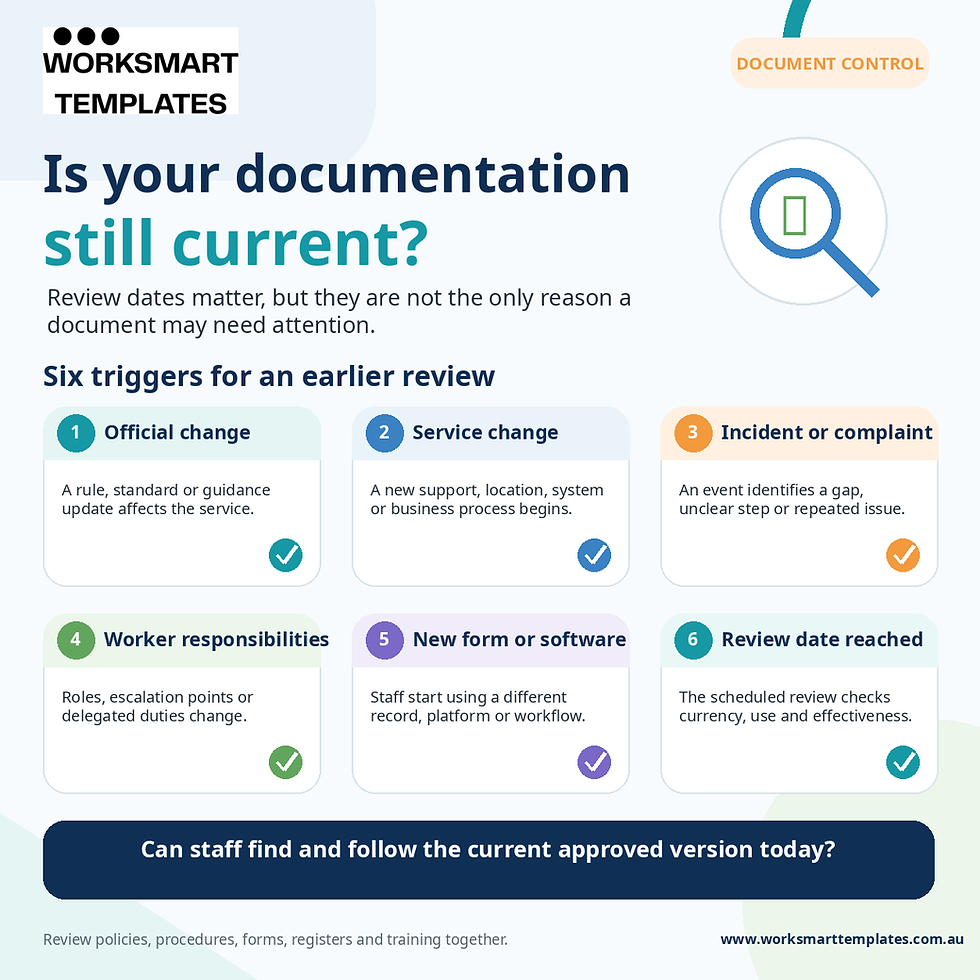
Do not rely only on an annual review date. Review documents when there is:
a change to legislation, rules or official guidance;
a change in registration or service delivery;
a new participant group or higher-risk support;
an incident, complaint or identified safeguarding concern;
an audit or internal review finding;
a change in worker responsibilities;
a new recordkeeping or software system; or
evidence that staff practice no longer matches the written process.
Clear records matter more than polished blank forms
An unused template is not evidence that a process is operating effectively.
For example:
a complaint policy explains the system;
a complaint form captures the concern;
a complaints register tracks matters and actions; and
completed records demonstrate how the complaint was handled and whether improvements followed.
The NDIA’s recordkeeping guidance for providers explains that documentation requirements vary across support categories. Complete and accurate records may also be requested when claims are reviewed.
Incident records require particular care. The NDIS Commission explains that incidents connected with NDIS supports should be identified, assessed, recorded, managed and resolved. All providers should have an incident-management process, while registered providers have additional incident-management and reportable-incident obligations. See the Commission’s incident management guidance.
Service agreements are another area where wording must be accurate. The NDIA recommends written service agreements in most provider relationships, but they are only mandatory for specialist disability accommodation supports. See What is a service agreement?.
Protect privacy when using digital templates
NDIS documents can contain sensitive information about a person’s disability, health, relationships, behaviour, support needs and daily life.
Do not assume a small provider is automatically exempt from the Privacy Act because its turnover is below $3 million. The OAIC explains that some small businesses—including health service providers—are covered regardless of turnover. Providers can use the OAIC’s small-business privacy checklist to help assess their position.
Where the Australian Privacy Principles apply, APP 11 requires reasonable steps to protect personal information from misuse, interference, loss and unauthorised access, modification or disclosure.
Practical controls may include:
role-based access;
multi-factor authentication;
secure backups;
controlled sharing permissions;
approved devices and software;
secure disposal or de-identification;
documented retention requirements; and
processes for removing access when a worker leaves.
Providers should also consider whether an online service stores or makes information accessible overseas and whether additional privacy obligations apply.
Common template mistakes to avoid
Watch for:
leaving generic placeholders in the final document;
describing processes your service does not actually use;
keeping several uncontrolled master copies;
using an outdated law or guidance document;
pre-completing consent or decision-making fields;
using small text, poor contrast or inaccessible layouts;
storing participant records in broadly shared folders;
assuming every service agreement is legally mandatory;
applying one retention period to every type of record;
promising that a template is “compliant” or guarantees an audit outcome; and
updating a policy without also updating related forms, registers and staff instructions.
Final checklist before using an NDIS template
Before approving the document, ask:
Does it match our provider type and services?
Does it support participant rights, privacy, choice and dignity?
Are responsibilities and escalation points clear?
Have all generic instructions and placeholders been removed?
Is the document accessible to its intended users?
Does it have an owner, version and review date?
Are completed records stored securely?
Have workers been trained to use it?
Have old versions been removed from active use?
Has any complex legal, clinical or safeguarding content received appropriate professional review?
Make your documentation system easier to use
The best template is not simply the one that looks the most professional. It is the one that fits its purpose, reflects how your service operates and helps people complete the right information at the right time.
WorkSmart Templates provides editable NDIS operational templates and forms, as well as policies, procedures and practical documentation resources for Australian providers.
You can also read How Our Templates Work to understand the available formats, digital delivery and customisation requirements. File inclusions vary, so check each product description before purchasing.
Official references and further reading
Disclaimer:
This article provides general information and documentation guidance current as at 25 August 2026. It is not legal, compliance, clinical, financial or business advice. Requirements vary according to registration status, services, location and individual circumstances. Templates must be reviewed, customised and implemented appropriately, with professional advice obtained where required.